Header Maker: A Bold Font for Editorial Design
As I sat down to redesign the header for my lifestyle blog, I found myself searching for a font that could capture the essence of the content while standing out visually. After trying several options, I discovered Header Maker—a display font that felt both modern and approachable. Its chunky, bold character made it ideal for headlines, while its clean structure ensured it didn’t overwhelm the reader.
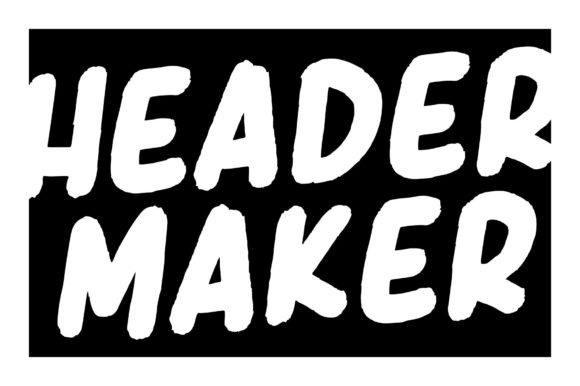
Header Maker has a distinct personality. It’s not overly ornate, but it carries a confident presence that works well in editorial spaces. The font’s rhythm is balanced, with even spacing between letters and a consistent weight that makes it easy to read at larger sizes. This makes it perfect for titles, headers, and other prominent text elements where clarity and impact are key.
One of the things I appreciate most about Header Maker is how it blends into a design without demanding too much attention. It doesn’t shout, but it doesn’t blend in either. Instead, it sits comfortably in the middle—ideal for creating visual hierarchy without disrupting the flow of content. Whether used for a blog header, an ebook title, or a newsletter graphic, it adds a sense of authority and style.
I’ve used Header Maker in a variety of editorial projects, from a recipe ebook to a wedding planning guide. In each case, it provided a strong foundation for the design while allowing the supporting text to shine. For instance, when designing a printable planner, I paired it with a soft serif font for body copy, letting the Header Maker headings draw the eye without competing with the rest of the layout.
When working on a digital magazine, I experimented with using Header Maker for section headings and pull quotes. Its boldness helped separate different parts of the layout, making the content more scannable. At the same time, its simplicity meant it didn’t distract from the images or the main text. This balance is crucial in editorial design, where the goal is to guide the reader through the content smoothly.
For long-form content, such as a coaching workbook or a course PDF, I found that Header Maker worked best for chapter openers and subheadings. It added a sense of structure without being too rigid. When paired with a clean sans serif font for the body, it created a professional yet inviting look that kept readers engaged.
Header Maker also performs well in print materials. Whether used for a brochure, a flyer, or a business card, it maintains its clarity and impact. Its chunky design ensures it remains legible even at smaller sizes, which is important for printed pieces where space can be limited.
One thing to consider when using Header Maker is its suitability for different languages. While it works well for English, I recommend checking if it includes multilingual support if your project involves other languages. This is especially important for international publications or multilingual content.
Font pairing is another key consideration. As a display font, Header Maker pairs well with more subdued typefaces. For example, combining it with a classic serif font like Georgia or a modern sans serif like Open Sans can create a balanced and professional look. This is particularly useful in newsletters, where a mix of bold and readable fonts helps guide the reader through the content.
In web design, Header Maker can be used for navigation menus, hero sections, or call-to-action buttons. Its boldness makes it stand out on a page, helping to direct the user’s attention. However, it’s important to use it sparingly, as overuse can make a site feel cluttered or unprofessional.
For social media graphics, Header Maker adds a touch of creativity without being too flashy. It works well for captions, post titles, or promotional banners, giving the content a polished and cohesive look. Its versatility makes it a valuable addition to any designer’s toolkit.
When selecting a font for a project, it’s always wise to test it across different mediums. Header Maker holds up well on screens, in PDFs, and in print, making it a reliable choice for a wide range of applications. Its clean design ensures it remains readable at various sizes and resolutions, which is essential for digital and print publications alike.
Overall, Header Maker is a versatile and effective display font that can enhance a wide range of editorial projects. Its bold yet refined character makes it ideal for headers, titles, and other prominent text elements, while its clean structure supports readability and visual harmony. Whether you're designing a blog, an ebook, or a printable guide, Header Maker offers a stylish and functional solution for your typography needs.
As I continue to explore new ways to use Header Maker in my designs, I’m consistently impressed by its ability to elevate the visual appeal of a project without sacrificing clarity or usability. It’s a font that feels both modern and timeless, making it a great choice for anyone looking to add a touch of sophistication to their editorial work.
For those considering Header Maker for their next project, I recommend experimenting with different weights and pairings to find the right balance for your design. Whether you’re working on a lifestyle blog, a recipe ebook, or a digital magazine, this font has the potential to become a key element in your brand’s visual identity.