Unicorn: A Bold Display Font
Choosing the right font for a project can feel like selecting the perfect accessory for an outfit—subtle, yet essential. When I was redesigning a lifestyle blog’s header, I found myself drawn to Unicorn, a display font that exudes energy and charm. Its vibrant character and playful structure made it stand out in a sea of more conventional typefaces.
Visual Character and Personality
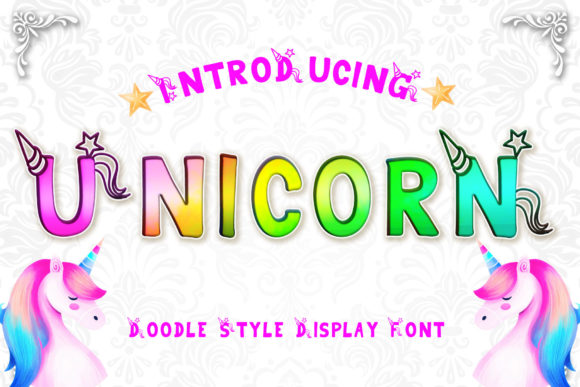
Unicorn is a display font with a friendly, approachable vibe. Its letterforms are bold and colorful, with subtle flourishes that give it a whimsical touch. The rhythm of the font feels natural, as if it were designed to dance across a page rather than sit still. It carries a sense of optimism, making it ideal for content that aims to inspire or delight.
Editorial Appeal and Versatility
What makes Unicorn particularly appealing is its versatility. It works well in a variety of editorial contexts, from blog headers to magazine covers. In one instance, I used it for a recipe ebook title, where its lively presence immediately caught the eye. It also paired beautifully with a clean serif font for the body text, creating a balanced and readable layout.
Use Cases in Real Projects
Unicorn shines when used for titles, headings, and decorative elements. For a wedding guide, I applied it to section headers, giving each chapter a distinct personality while maintaining overall readability. In a coaching workbook, it served as a pull quote, drawing attention to key insights without overwhelming the reader.
It also proved effective in newsletter graphics, where its boldness helped highlight important messages. When used in a printable planner, it added a touch of creativity without sacrificing clarity. These real-world applications show how Unicorn can enhance visual hierarchy and support content structure.
Readability and Practical Considerations
While Unicorn is expressive, it’s not without limitations. Its bold strokes and intricate details make it less suitable for long-form reading. Body copy, small captions, or dense paragraphs would struggle to maintain legibility in this font. However, when used strategically for titles and accents, it enhances the reader’s experience by guiding their attention and setting the tone.
For screen reading and mobile layouts, it’s important to test Unicorn at different sizes and backgrounds. In PDF exports, it maintains its character, but for print materials, ensure that the font is properly embedded to avoid rendering issues. For long-form content, consider using it sparingly to avoid visual fatigue.
Font Pairing and Design Assets
Pairing Unicorn with other fonts can elevate its impact. A classic serif font like Georgia or Garamond provides a strong contrast for body text, while a modern sans serif like Helvetica or Open Sans offers a clean look for captions and navigation. This combination creates a cohesive design language that supports both aesthetics and readability.
Before integrating Unicorn into any project, check the included styles, alternates, and ligatures. These features can add depth and variation to your design. Also, verify multilingual support and file formats to ensure compatibility with your workflow. Commercial licensing is essential for projects that involve ebooks, templates, or client work.
Creating Brand Identity and Audience Engagement
Unicorn has the potential to become a signature element of a brand’s identity. Its unique character can help distinguish a publication or product in a crowded market. Whether it's for a digital magazine or a course PDF, using Unicorn consistently reinforces brand recognition and builds a connection with the audience.
Its playful nature makes it particularly effective for content targeting younger demographics or creative industries. However, it’s important to align its use with the overall tone of the publication. A formal report might not benefit from its expressiveness, but a lifestyle blog or a creative workshop could thrive with it.
Ultimately, Unicorn is more than just a font—it’s a tool for storytelling. It brings a sense of joy and creativity to any project, making it a valuable addition to a designer’s toolkit. Whether you're working on a blog header, a cookbook cover, or a printable guide, Unicorn offers a fresh and engaging way to present your content.